To enhance our infrastructure for capturing Email and SMS One-Time Passwords (OTP), we require all consignors to update their email and SMS forwarding rules. If you are using a catch all email, please add this rule to that account, otherwise add the rule to all email accounts. Failure to make this update could impact our ability to fulfill orders promptly and may require additional password-related support.
Benefits of this upgrade for OTP capture:
Faster speeds and less interruptions
Reduced unnecessary password-related contacts
Enhanced support for our fulfillment automations
Steps to Configure your Email to auto forward:
Update Email Forwarding:
Navigate to your Gmail or email inbox auto-forwarding settings.
Add sendgrid@campaign.stagefront.com as a Forwarding Address (for Gmail: Settings → Forwarding and POP/IMAP).
Our team will confirm the auto-forwarding address within 24 hours.
Set Up Forwarding Rules:
After confirmation, update the following rules to your auto-forwarding settings (for Gmail: Filters and Blocked Addresses):
Rule 1: Matches: Here's Your Authentication Code
1. Select 'Create a new filter'
2. Copy the text below as criteria for what is contained in the email (for Gmail: 'Has the words')
Here's Your Authentication Code
3. Continue to the next screen (for Gmail: 'Create Filter')
4. Select 'Forward it to:' and choose 'sendgrid@campaign.stagefront.com' from the dropdown
5. Select ' Create Filter'
Rule 2: Matches: Verify your email address MLB account (if applicable).
1. Select 'Create a new filter'
2. Copy the text below as criteria for what is contained in the email (for Gmail: 'Has the words')
Verify your email address MLB account
3. Continue to the next screen (for Gmail: 'Create Filter')
4. Select 'Forward it to:' and choose 'sendgrid@campaign.stagefront.com' from the dropdown
5. Select ' Create Filter'
Rule 3: Matches: Action Needed: Verify Your Device With AXS
1. Select 'Create a new filter'
2. Copy the text below as criteria for what is contained in the email (for Gmail: 'Has the words')
Action Needed: Verify Your Device With AXS
3. Continue to the next screen (for Gmail: 'Create Filter')
4. Select 'Forward it to:' and choose 'sendgrid@campaign.stagefront.com' from the dropdown
5. Select ' Create Filter'
Update SMS Forwarding:
Add “sendgrid@campaign.stagefront.com” to your email forwarding in third party apps like SeatHeros, Etc. To help expediate the process we have included some steps on how to setup SeatHeros. Please consult their support if you need further assistance.
Seat Heros
Once you log in to the site, you will click on “integrations” in the left menu.
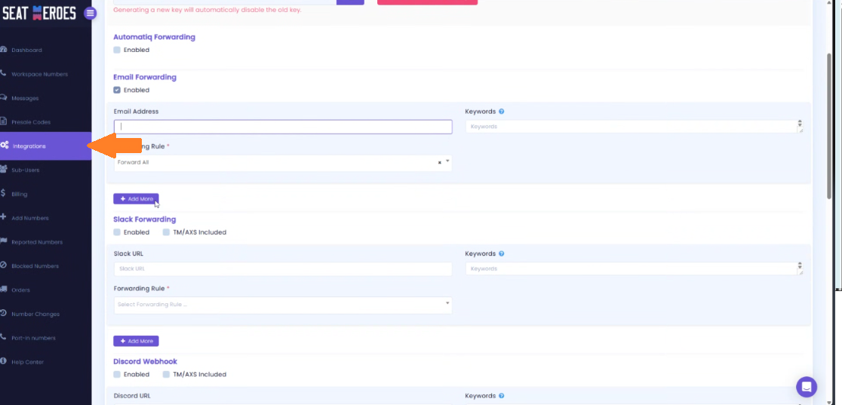
Under “Email forwarding” Enter your “Catch All” email into the Email Address field.

You can use keywords in the “Keywords” section to help define what messages you wish to have forwarded to us.
Assistance is Available:
Our Client Relations team will be contacting consignors who haven’t made the update via email and SMS this week. If you have questions or need help, please contact your Customer Representative or email us at support@stagefronttickets.com.
Was this article helpful?
That’s Great!
Thank you for your feedback
Sorry! We couldn't be helpful
Thank you for your feedback
Feedback sent
We appreciate your effort and will try to fix the article